Showing posts with label Key Vault. Show all posts

02 July, 2020

Azure Security : Monitor KeyVault events to generate instant notification

Security is everybody's responsibility. How many times you have heard this bold one liner? I am sure it's too many times during any design discussion or working with the security folks of any organization. 😐

So, when the talks starts rolling towards managing secrets and keys, one service of Azure you just cannot ignore is Azure KeyVault. You can keep all your secret parameters in this highly recommended HSM-protected managed vault and can securely use them from other services without the fear of those getting exposed. Great, you have implemented a fine level of security and a big round of applause 👏👏 in the room. 

But.. ummm ...ok.. Now what about someone having access to the vault; intentionally (or accidentally may be a proper word) changes the value of any secret behind the scene without your knowledge. All the dependent downstream systems suddenly stops functioning and becomes unavailable straightaway. Isn't this qualifies for a security breach? Agree! 😔

I love a famous saying "It's not about the change but not having any knowledge of that change leads to road block". Let's take this as a thumb-rule and implement a notification system in place when someone adds/updates a secret in the KeyVault with a serverless approach throughout.

This article may also help you in your AZ-500 : Microsoft Azure Security Technologies preparation and lab. Let's dive! 👍

Prerequisites:
  • Azure Subscription (Free subscription of 30 days will also do)
  • SendGrid API Key (Follow this to create a free SendGrid account if you do not have it already and get the API Key)
  • Basic knowledge of Azure services
We will use Azure Logic Apps along with Event Grid trigger to catch any KeyVault change event and would fire an instant email notification to the administrators. 
  • Login to Azure (If you do not have any subscription already then create one else login to your existing one) 
  • Create a resource group and then create a KeyVault in that resource group. Follow this link if you are new to KeyVault. Just create the vault and do not add any secrets now.
  • Create an Azure Logic App (you can give any name of your choice; I have given kv-change-notification)
  • Go to your Logic App and in the designer select the Event Grid trigger as below
  • Select your tenant and hit Sign In. This will ask you for your Azure credential and will create your Event Grid connector.
  • Click "Continue" to attach the event. Fill the details as required to connect with your KeyVault created earlier.

Select your Subscription, 
Resource Type as "Microsoft.KeyVault.vaults",
Resource Name is your KeyVault name (In my case I have give my vault name as MyVault0001),
Event Type Item - 1 as "Micsrosoft.KeyVault.SecretNewVersionCreated" 
  • Click "+ New Step" to choose the event to fire if the above step holds true. Search for SendGrid and select the send email action 
  • Provide a connection name and paste your SendGrid API . Hit Create. This will validate and would create your SendGrid connector.
  • If the above validation is successful, the next window would ask you to provide all the mailing details. Fill it up as per the requirement. Make sure the From and To email addresses really exists.
  • Hit Save at the top to save the logic app workflow. This is important.
Testing Time! 🙆

Go to your KeyVault resource and enter a new secret. 


Check your mail. Voila! You have new mail 📧


Now go ahead and modify the value of the secret in the vault and get notified once again. Great job!
So, with just few clicks you have developed a robust solution (that too serverless) which surely going to make the security admins very happy. Applause 👏 once again.

Congratulations! for coming this far. Hope this article will help you to further explore this feature.

Do share with me about your experience and what you have built upon this foundation. You can take it up to any level and integrate. I would love to hear from you.

11 May, 2020

Azure Key Vault Referencing

Company: We have a simple web application developed in Asp.Net (.aspx pages) with few users and want to migrate that to Azure quickly with no changes.
Me: OK. Will simply host that web application to Azure App Service (Web App) 😊

Company: But the application has secrets hard-coded in the web-config file
Me: OK.. no problem. Will put those secrets in Azure Key Vault and will get rid of those hard coded values from the config 😊

Company: But that will need hard coding of the Key Vault access requirements back in web.config
Me: OK.. will use Azure Managed Identity to access the Key Vault and bypass this hard coding issue all at once. 😊

Company: But that will introduce code changes in the application which we do not want
Me: 😏💥

Ha Ha!! a great design conversation, right! and what will be your answer this time. Take a pause and think for 10 secs.... If you are thinking about the new Key Vault referencing feature ... you are bang on target 👍

Let's dive and see what's it all about.

Assuming the web application  have a configuration settings as below
<appSettings>
    <add key="TopSecret" value="Top Secret message from Application configuration" />
</appSettings>
And its accessing this value in the Page_Load event
protected void Page_Load(object sender, EventArgs e)
{
   var secretMsg = ConfigurationManager.AppSettings["TopSecret"];
   ViewState["TopSecret"] = secretMsg;
}
And displaying the value in the page
<div>            
   <span style="font-weight:bold; font-size:larger;"><% =ViewState["TopSecret"] %></span>  
</div>

Now our challenge is to deploy this application in the cloud without any code changes.

  • Create an Azure Web App and deploy this application. Now go to the Identity under Settings  and make sure you switch on the System Assigned status as below
  • Create a Key Vault and then add a new access policy (Settings >> Access policies >> + Add Access Policy. Make sure you give Secret permissions as 'Get' to your application and create a policy similar as below. Click Add and then Save.

  • Add a secret now to your Key Vault. I have given the name as "TopSecret' and value as "Top Secret message from KeyVault configuration". You can give anything as per your choice. Click Create.
  • Now click "TopSecret" from the "Secrets" dashboard and copy its version number
  • OK.. Now open notepad and generate a string like this below. 
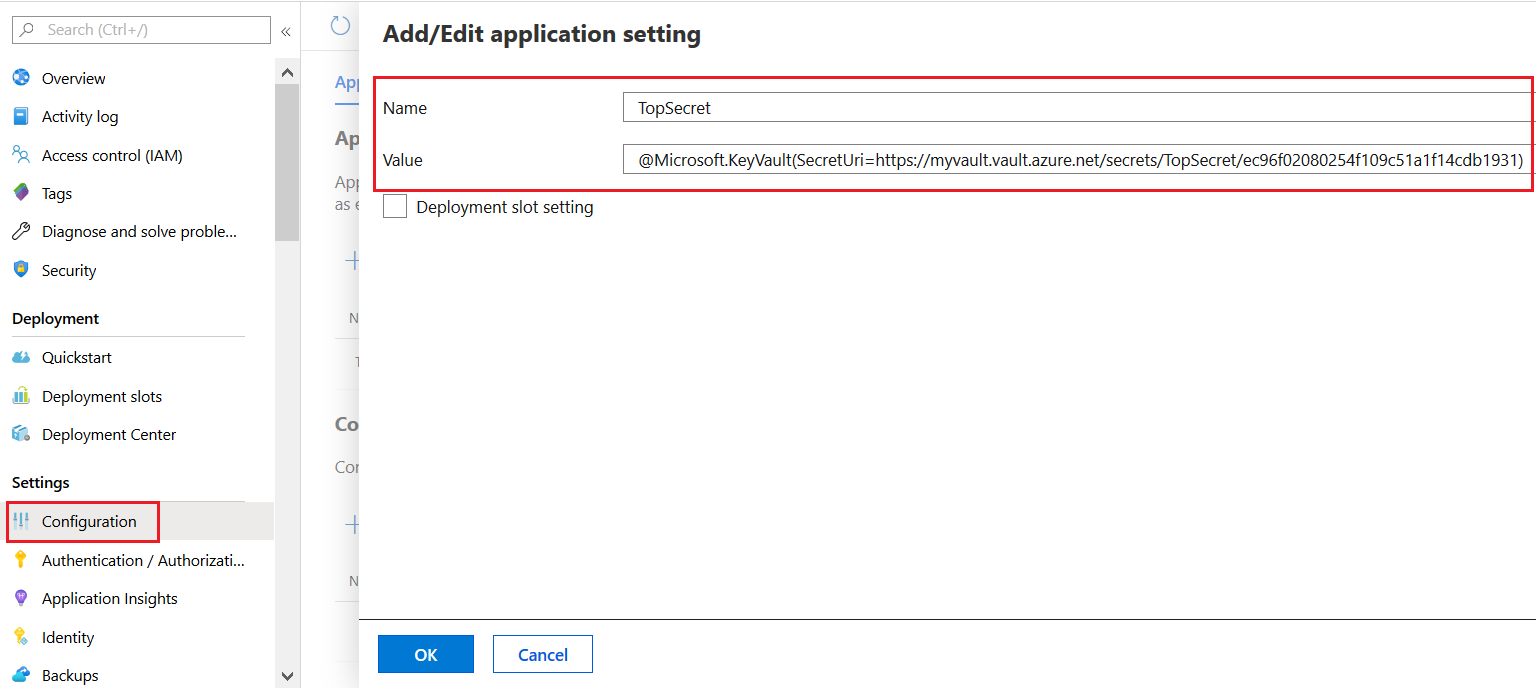
@Microsoft.KeyVault(SecretUri=https://myvault.vault.azure.net/secrets/TopSecret/ec96f02080254f109c51a1f14cdb1931)

Replace the highlighted (red) parts with your values. These are nothing but the name of your Key Vault, name of the Secret and the version number of that secret you just copied.
  • Now go to your web app and open Settings >> Configuration and add a new application settings. Give the name same as it was there under in the web.config file (scroll up to see that section). This is important. In our case it's "TopSecret". The value of this settings should be the string you just constructed above. Click OK and Save.

  • Run the application in the cloud and voila ... the application is reading data from the Key Vault and not from the application web.config anymore. And that too with noooooo code changes.
Great Job and Congratulations! for coming this far. Hope this article will help you to further explore this feature.

Do share with me about your experience and what you have built upon this foundation. You can take it up to any level and integrate. I would love to hear from you.